JZ666 Game18+
JZ666 Download: Get the APK for Android
JZ666 download guide: get the latest JZ666 APK for Android, choose Speed App or the shortcut, install it safely and fix common install errors. 18+ only.
- Updated
- Size
- 9.6 MB
- Version
- 1.0.6
- Requirements
- Android
This JZ666 download guide is only about getting the JZ666 app onto your phone: where to download it, which download option to choose, how to install it, and what to do when Android blocks the install. For what JZ666 is and its bonuses, see our JZ666 Game page.
JZ666 APK at a glance
| Detail | JZ666 app |
|---|---|
| File type | Android app (APK) or home-screen shortcut |
| Latest version | 1.0.6 (approximate) |
| Download size | About 9.6 MB |
| Works on | Android phones, plus a shortcut option in the mobile browser |
| Download offer | Up to Rs 9,999 for downloading and using the app |
| Price | Free to download; real-money play inside |
| Age | 18+ only |
Version and size are approximate and change with each release.
How to complete the JZ666 download
- Tap Download JZ666 APK at the top of this page. The JZ666 website opens in a new tab.
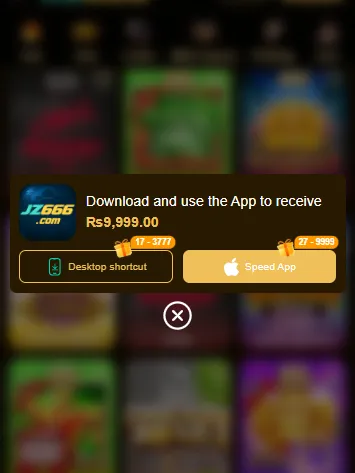
- Wait for the JZ666 home screen to load, then open the app download pop-up. It says "Download and use the App to receive Rs9,999.00".
- Pick Desktop shortcut or Speed App (see the comparison below).
- Let the file finish downloading before you leave the page.
Desktop shortcut vs Speed App
The JZ666 pop-up gives you two ways to put the app on your phone. Each carries its own reward badge.
| Option | What it does | Badge shown |
|---|---|---|
| Desktop shortcut | Adds a JZ666 icon to your home screen that opens the site in your browser | 17 - 3,777 |
| Speed App | Installs the JZ666 app (the button shows an Apple logo) | 27 - 9,999 |
If you only want quick access, the Desktop shortcut needs no install permission at all. If you want the full app, choose Speed App and follow the install steps below.
How to install the JZ666 APK on Android
- Open the downloaded file from the notification bar, or from Files › Downloads.
- If Android says the install is blocked, tap Settings and turn on Allow from this source for your browser.
- Go back and tap Install. It takes a few seconds.
- Turn Allow from this source off again, so other apps can't install files without asking.
- Open JZ666 from your home screen and check the icon shows the cyan and gold JZ666 logo.
New to APK files? Our guide on installing APK files safely explains the "unknown apps" permission in more detail.
The Rs 9,999 app download offer
The download pop-up promises up to Rs 9,999 for downloading and using the app. The badges, 17 to 3,777 for the shortcut and 27 to 9,999 for the Speed App, suggest the reward is a range, not a fixed Rs 9,999. The pop-up doesn't show the conditions, so check the offer terms in the app before you rely on it.
How to update JZ666 to the latest version
Because you install JZ666 from its website rather than the Play Store, it won't update itself through Google Play. When a new version comes out, download it again from the JZ666 site and install it over the old one. Your account stays the same, because it's stored on JZ666's servers, not on your phone. If the new file won't install over the old one, uninstall the old app first and then install the new one.
Fix common JZ666 install problems
| Problem | Likely cause | What to do |
|---|---|---|
| "App not installed" | An older version with a different signature is installed | Uninstall the old JZ666 app, then install again |
| "Install blocked" | Unknown apps are not allowed for your browser | Allow installs from your browser, install, then switch it off |
| Play Protect warning | The app isn't from Google Play | Only continue if the file came from the JZ666 site |
| "There was a problem parsing the package" | The download didn't finish | Delete the file and download it again on a stable connection |
| Download won't start | Low storage or a pop-up blocker | Free up at least 50 MB and allow pop-ups for the JZ666 site |
Is the JZ666 APK safe to download?
An APK is safe to install only if it comes from the developer. Download JZ666 from the JZ666 site our button opens, never from WhatsApp or Telegram groups, file-sharing links or "mod" sites, which may hide malware. JZ666 is a real-money app and we couldn't verify its operator or licence, so installing the app safely doesn't make the money side risk-free.
FAQs
Is the JZ666 APK free?
Yes. Downloading and installing JZ666 is free. Games inside the app use real money, which you add through deposits.
Can I download JZ666 from Google Play?
JZ666 offers its app through the download pop-up on its own website, not through a Google Play link. If you see a JZ666 app in an app store, check the developer name carefully, because look-alike apps are common.
How big is the JZ666 APK?
About 9.6 MB, but the size changes with each version. Keep at least 50 MB free so the app can install and store its data.
Which should I choose, Desktop shortcut or Speed App?
Choose the Desktop shortcut if you just want a home-screen icon that opens JZ666 in your browser. Choose the Speed App if you want the installed app.
Why does my phone warn me about the JZ666 APK?
Android warns about every app installed from outside Google Play. The warning doesn't mean the file is harmful, but only continue if you downloaded it from the JZ666 site.