
JZ666 Game18+
JZ666 Login: How to Sign In to Your Account
JZ666 login help: sign in with your phone number, profile name or Google, reset a forgotten password, fix login errors and avoid fake JZ666 login pages.
JZ666 login is for players who already have an account and need to get into it. It covers the three ways to sign in, what to do when you've forgotten your password, the most common login errors, and how to keep your account safe. Don't have an account yet? Start on the JZ666 register page.
JZ666 login steps
- Open the JZ666 app, or tap Go to JZ666 Login on this page.
- Tap Login. It's at the top right of the home screen, next to Register, and in the bottom bar.
- Enter the phone number or profile name you registered with.
- Enter your password. Tap the eye icon to check what you typed.
- Tap Login.
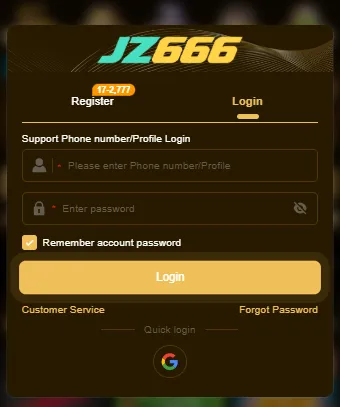
JZ666 Google login
Below the Login button there's a Quick login option with a Google logo. Use it if you created your account through Google binding registration. If you registered with a phone number and password, Google login may not find your account, so stick with the method you signed up with.
Forgot your JZ666 password?
Tap Forgot Password on the login screen and follow the steps to set a new one. If you registered with a phone number, keep that phone nearby. If you used a profile name and can't recover it, tap Customer Service on the same screen. Never post your account details in public groups to ask for help.
"Remember account password": should you use it?
The checkbox saves your login details so you don't have to type them each time. Keep it ticked only on your own phone. On a shared or borrowed phone, untick it before you log in, and log out from Profile when you're done.
JZ666 login problems and fixes
| Problem | Likely cause | Fix |
|---|---|---|
| Password not accepted | A typo, or caps lock on | Tap the eye icon to check, then try again or use Forgot Password |
| Account not found | You registered with a different number, profile name or Google | Try the other sign-in method you might have used |
| Logged out every time | Browser data was cleared, or "Remember" is off | Tick Remember account password on your own phone |
| Login page won't load | Weak connection or an old app version | Switch between Wi-Fi and mobile data, or update via our JZ666 download page |
| Account locked or restricted | The reason isn’t shown on the login screen | Contact Customer Service from the login screen |
Keep your JZ666 account safe
- Only log in through the JZ666 app or site. Fake login pages shared in WhatsApp and Telegram groups copy the JZ666 design to steal passwords.
- Never share your password or one-time codes, even with someone claiming to be JZ666 support or an "agent".
- Use a unique password, different from your email, JazzCash and Easypaisa passwords.
- Check your balance after logging in. If anything looks wrong, change your password straight away.
FAQs
How do I log in to JZ666?
Tap Login, enter your phone number or profile name and your password, and tap Login. You can also use Google quick login if you signed up with Google.
What do I do if I forgot my JZ666 password?
Tap Forgot Password on the login screen and follow the steps. If that doesn't work, tap Customer Service on the same screen.
Can I log in to JZ666 on two phones?
You can sign in with the same details on another phone. For safety, untick Remember account password on any phone that isn't yours.
Why can't I log in with Google on JZ666?
Google quick login only opens your account if you registered with Google. If you signed up with a phone number, log in with your number and password.
Is it safe to log in to JZ666 from a link someone sent me?
No. Open the JZ666 app or the site from our button instead. Links in chat groups can lead to fake login pages.